

Documents
The Documents feature is a central repository where your organisation can securely store and manage sustainability-related documentation within Endura. These documents serve as supporting evidence for sustainability assessments, disclosures, and reporting activities, ensuring that information captured on the platform is accurate, verifiable, and audit ready.
Documents uploaded to Endura can also assist with the assessment process by helping validate responses and, where applicable, supporting answer prepopulating to reduce manual data entry and improve reporting efficiency.
Accessing the Documents Library
1. From your organisation's Dashboard, navigate to the top navigation menu.
2. Click Documents.

This will open the Supporting Documents page, where all uploaded sustainability-related documents can be viewed and managed.
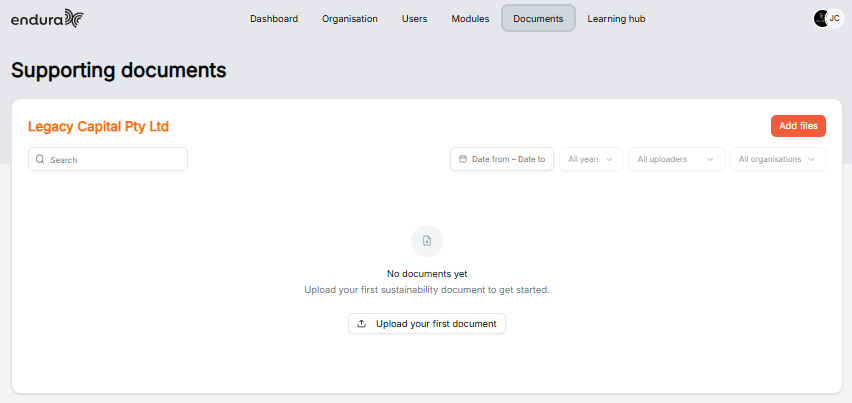
Understanding the Supporting Documents Page
The Supporting Documents page is designed to help users easily upload, organise, search, and retrieve sustainability documentation.
Organisation Name
At the top of the page, the organisation name is displayed, indicating which organisation's document library you are currently viewing.
Use this to confirm that documents are being uploaded to the correct organisation.
Search Bar
The Search function allows you to quickly locate documents by name.
Use the search bar when:
- Looking for a specific document.
- Locating previously uploaded evidence.
- Reviewing documentation related to a particular topic or assessment.
Filter Options
Several filters are available to help narrow down document searches.
Date Range Filter
Filter documents uploaded within a specific date range.
Use this when:
- Reviewing documents submitted during a reporting period.
- Looking for recently uploaded information.
Year Filter
Filter documents according to the reporting or upload year.
Use this when:
- Comparing information across reporting years.
- Retrieving historical sustainability records.
Uploader Filter
Filter documents based on the user who uploaded them.
Use this when:
- Tracking document ownership.
- Identifying who submitted supporting evidence.
Organisation Filter
Filter documents by organisation where multiple organisations, divisions, or subsidiaries exist within the platform structure.
Use this when:
- Managing documentation across multiple entities.
- Reviewing entity-specific evidence.
Add Files
The Add Files button allows users to upload new documents to the platform.
To upload a document:
1. Click Add Files.
2. Select a Reporting year.
3. Click to Upload.
4. Confirm the upload.
The uploaded document will then be stored within the organisation's document library and become available to authorised users.
Upload Your First Document
When no documents have been uploaded, users will see the Upload your first document button.
Selecting this option performs the same function as Add Files and provides a quick way to begin building your organisation's document repository.
How Documents Support Sustainability Assessments
The Documents feature is more than a storage location. Documents uploaded to Endura can help support and strengthen the sustainability reporting process.
Supporting Evidence
Documents can be used as evidence to support information captured within sustainability assessments.
Examples include:
- Sustainability policies.
- ESG strategies.
- Carbon emissions reports.
- Environmental management plans.
- Training records.
- Compliance certificates.
- Governance documentation
- Audit reports.
Providing supporting evidence helps improve the credibility and transparency of assessment responses.
Data Validation
Uploaded documents can be referenced to validate data entered within assessments.
This helps organisations:
- Improve data accuracy.
- Reduce reporting errors.
- Ensure assessment responses are supported by documented evidence.
- Strengthen audit readiness and compliance processes.